The compute network
TokenBroker doesn’t rely on a single data center. It routes work to a network of compute nodes — desktops, phones, and personal API keys contributed by members like you — plus cloud-hosted models. This page explains how the network actually works, how to join it in whatever way fits your hardware, and exactly how you get paid for participating. If you want the case for why this exists at all, that’s Take back your compute; this page is the how.
Why a network?
Some models are small enough to run on a laptop. Others need serious GPUs. Some contributors have neither, but do have a spare phone or a free-tier API key sitting unused. A network lets the service take all of it: a node with an RTX-class GPU serves bigger local models, a modest node serves smaller ones, a phone or a GPU-less laptop relays cloud and external-provider work, and everything can fall back to a hosted cloud model when no node fits.
The more nodes join — in whatever form — the more capacity the network has, which keeps the service available around the clock and reduces reliance on any single piece of hardware, any single provider, or any single person’s uptime. That redundancy is the entire point, not an incidental benefit; see the full breakdown for why depending on more than one upstream is a deliberate design choice.
How nodes are chosen
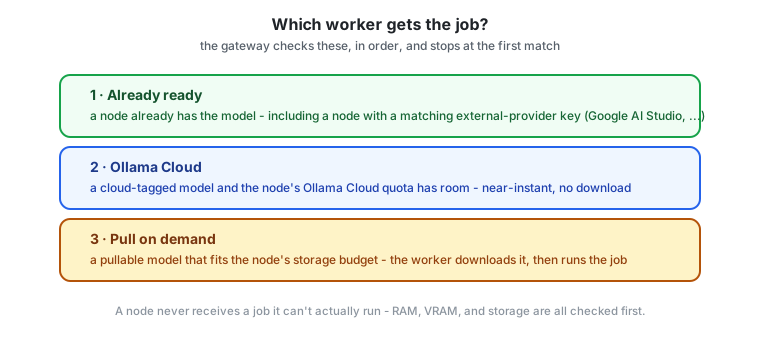
Every request is matched to the best available node for that model:
- A node that already has the model pulled and meets its requirements — fastest path.
- A node with enough disk space to pull the model on demand.
- A cloud-hosted model (e.g. Ollama Cloud) when the request is for a cloud model or no capable local node is online.
Nodes only ever receive work they can actually do — the gateway checks GPU VRAM, system RAM, and storage before assigning anything. A node never gets a job for a model it can’t handle.
Joining the network with the worker
The TokenBroker Worker is a small Windows application you download from your dashboard. Highlights:
- Easy install — download the bundle, double-click, done. No command line.
- Easy uninstall — a single uninstaller removes everything.
- Visible, not hidden — it lives in the taskbar tray with a live status window showing uptime, requests per minute, CPU/GPU use, and what it’s working on. It can minimize to the tray and run 24/7.
- Transparent — you see redacted prompts, compute cost, payment for each completed job, and timestamps.
- Private by design — the worker shows a redacted view of the prompt and never displays the requester’s identity. It cannot see who you are serving.
The worker connects outbound only — no ports are opened on your router.
What the worker needs
- Windows 10/11, 64-bit.
- Ollama installed (the worker uses it as the local inference engine).
- A GPU is a big advantage (more model families, bigger jobs), but not strictly required — smaller models run on CPU.
- Storage you’re willing to contribute. Models the worker pulls for the network are evicted automatically after 2 hours idle, so storage stays available for your own use.
Optional: connect your Ollama Cloud account
If you sign in to your free Ollama account in the worker, the node can take on cloud-hosted models too — including large models your hardware could never run. The worker tracks your cloud usage and reports how much remains, and it stops accepting cloud work the moment your free quota is exhausted (it resumes when the quota resets).
Optional: bring your own cloud API key
You don’t need a GPU, or even Ollama, to contribute real capacity. If you hold a free-tier API key from a supported external provider — Google AI Studio today — you can add it to your account on the Compute page, and every worker on that account (desktop or mobile) can serve jobs for that provider’s models directly, calling the provider’s own API with your key. This is a completely separate quota pool from Ollama Cloud, so an account with both contributes more capacity than either alone.
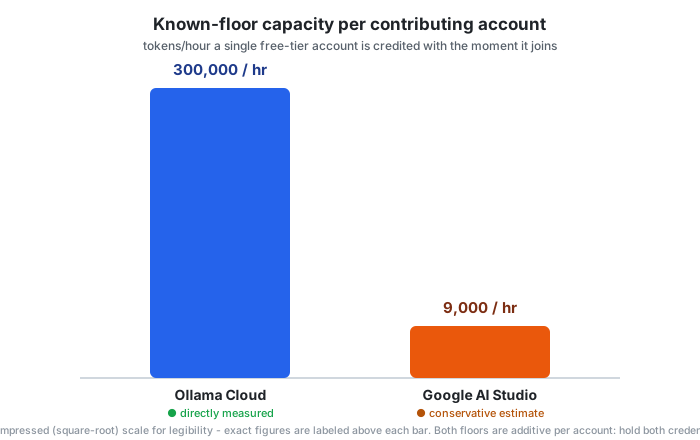
A brand-new worker is credited with a conservative baseline the moment it joins, rather than counting as zero capacity until it has a track record. Ollama’s baseline came from a real, deliberately bounded measurement (a controlled one-hour test run to completion with zero rate-limit errors); Google doesn’t publish a fixed limit at all, so that figure is a careful, conservative estimate instead — the live network status page always favors real measured throughput over either baseline once a worker has one.
Mobile workers (Android & iOS)
The network isn’t limited to desktops. A companion mobile app runs the same relay loop in the background — heartbeat, claim a job, run it, report back — using a foreground service so it keeps working with the screen off. A phone can’t run large local models, so it serves cloud-hosted and external-provider work (Ollama Cloud, or a provider key you’ve added to your account) rather than pulling models locally. Pairing a phone to your account takes a one-time code generated from the dashboard.
How workers earn credits
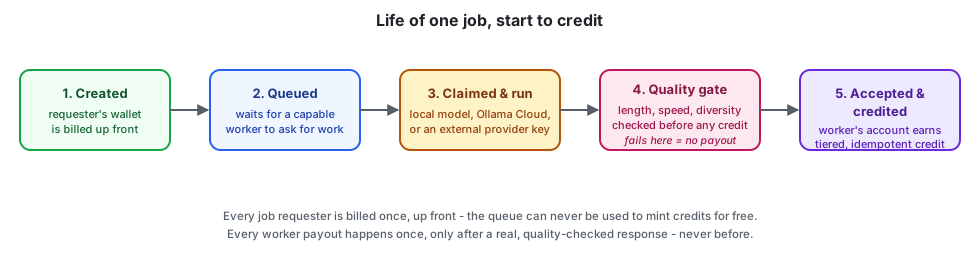
Every completed, accepted job pays credits into your account. Quality matters:
- The network grades completed work (response length, speed, variety, consistency).
- Premium, standard, and basic credit tiers exist. Well-behaved, well-performing nodes earn more valuable credits; low-quality nodes earn less valuable ones.
- Credits can be redeemed for API usage. They are not cash — 1 credit is not 1 cent. Their value depends on the quality tier and current network conditions.
Anti-exploit protections
The network is built to resist gaming:
- Minimum contribution before inference is accepted (tiny jobs are rejected).
- Duration and speed gates — instant/fabricated completions are caught.
- Diversity checks — canned or repeated responses are flagged.
- One worker per account, bound to a hardware fingerprint and the IP it registered from.
- VM detection — virtualized workers are rejected.
- Cloud quota honesty — a node that exhausts its cloud quota stops advertising cloud models until it resets.
These protections exist so that real users get real work done, and credits mean something.
Private (encrypted) jobs
Requests that need extra privacy can be submitted as private jobs: the hub encodes the prompt into an encrypted glyph, only trusted workers that have private jobs enabled receive it, and the worker decodes it in memory, computes, and returns the answer as an encrypted glyph. The worker never writes the prompt to disk and never displays it.
If you run a worker, you control this with the Priv on / Priv off button in the worker window (or the tray menu). Private jobs are on by default; turn them off and your node will only ever receive public work.
Live network status
Anyone — signed in or not — can see the network’s real-time aggregate capacity, how many independent accounts are contributing, and recent job activity at /network. The page also explains exactly how the numbers are calculated, including the honest caveats: some figures are directly measured, others are conservative estimates for a provider that doesn’t publish its own limits. It never shows per-node or per-person detail — only network-wide totals.
Worker dashboard
Your dashboard’s Compute page shows:
- Your node’s status, hardware fingerprint (never how it’s derived), and quality score.
- Expected performance based on the RAM, CPU, and GPU detected.
- A collapsible transaction history of every job and its earnings.
- Rejected worker attempts (and why) for full transparency.
- The worker download, the Ollama install link, and instructions.
Removing the worker
Uninstall is one double-click. The worker leaves no background services, and your account keeps whatever credits you’ve earned.
Pay-gated (subscription) models
Some Ollama cloud models require a paid ollama.com account (Pro/Max) rather than the free tier — a node without that subscription simply can’t run them. The network handles this automatically and transparently:
- Each worker figures out on its own whether its Ollama account can access paid-tier models, and reports that status honestly.
- A model that turns out to need a paying account gets remembered per node — a free-tier node stops being offered (and stops advertising) work it already proved it can’t do, instead of failing the same way repeatedly.
- Before a job is queued at all, the network checks whether any currently online worker can actually serve that model right now. If none can, you get an immediate, clear error explaining the model may need a paid-tier worker — instead of a job that sits in the queue until a timeout expires and fails anyway.
Related reading
- Tested & verified — the real one-hour throughput probe behind the Ollama Cloud numbers on this page, and a real networking bug found and fixed on the mobile client.
- Pricing & credits — the exact $ value of a credit by tier, and the referral program.
- FAQ — quick answers about worker safety, earnings, and mobile setup.
- Take back your compute — why joining matters beyond your own account.